The Golfcasters
Russ, Ian and Sloan, the voices of FOREPAID. Who they are, how to pick one, and how to dial them in.
1. Meet the crew
FOREPAID has three AI voices we call Golfcasters. One of them calls your round live, from the first tee to the final putt.

Ian
The Scottish links caddie
Ian carried bags on the links of Scotland’s east coast for fifty years. Wind, rain, and every kind of golfer you can imagine. He’s dry, he’s honest, and he won’t flatter you. He’ll read you the hole and tell you the truth about your round, quietly.

Russ
The muni legend
Russ learned the game on the muni and spent forty years on the first tee calling every Nassau, every skin and every snake. He has seen every kind of golfer. He’s not mean and he’s not soft. He’s honest, to a fault.

Sloan
The club champion
Sloan is a three-time club champion who plays to scratch and has heard every excuse in the game. She calls it like a TV analyst: what you decided, what you hit, and why it went where it went. Praise is rare, so when she gives it, you earned it.
Want to hear them? Each one introduces themselves on the home page, and in the app’s Booth.
Whoever you pick does the same job. They announce every player to the first tee by name, call the big moments as scores go in, caddie each hole, and write the recap when you finish. Most of what makes a FOREPAID round more fun than typing scores into a spreadsheet runs through your Golfcaster.
2. Picking your Golfcaster
The host picks one Golfcaster for each round. It’s on the Golfcaster card, the last card in Game Setup, under YOUR GOLFCASTER. Everyone in the round hears the same voice. Setup remembers your last pick.
Russ is built in. Ian and Sloan download in the background. If the one you pick isn’t ready yet, you can start anyway, and Russ covers until they are.
Changed your mind mid-round? The host can switch voices from the ☰ MENU (the Golfcaster row). The new voice takes over for the whole group.
You get the same choice in Play solo, where you can also turn on Play against your Golfcaster for a head-to-head match. In the Rangefinder, pick the voice that calls your clubs from its ☰ MENU (Club calls by).
Not sure who to pick? Go to the Booth tab and listen to all three first. See The Booth below.
3. The three trash-talk levels
How spicy your Golfcaster gets is up to the host. There are three levels:
Friendly
No hurt feelings. Locker-room without the bite. Good for new players, the boss in the foursome, or kids in the cart. Everyone starts here.
Spicy
Ribbing with an edge. Calls out the blow-ups and celebrates the birdies.
Uncensored
Adults only. It’s the host’s call. Picking it at setup pops an 18+ confirmation the host has to accept for the group.
Every player hears the same level. The level belongs to the round, not the player. If the host picks Spicy, every phone in the round hears Spicy.
4. Setting the level
Before the round
The host sets the level on the Golfcaster card in Game Setup, right under the voice. It starts on Friendly the first time. After that, setup remembers the level you used last. Want to hear a level before you pick it? Play the samples in the Booth.
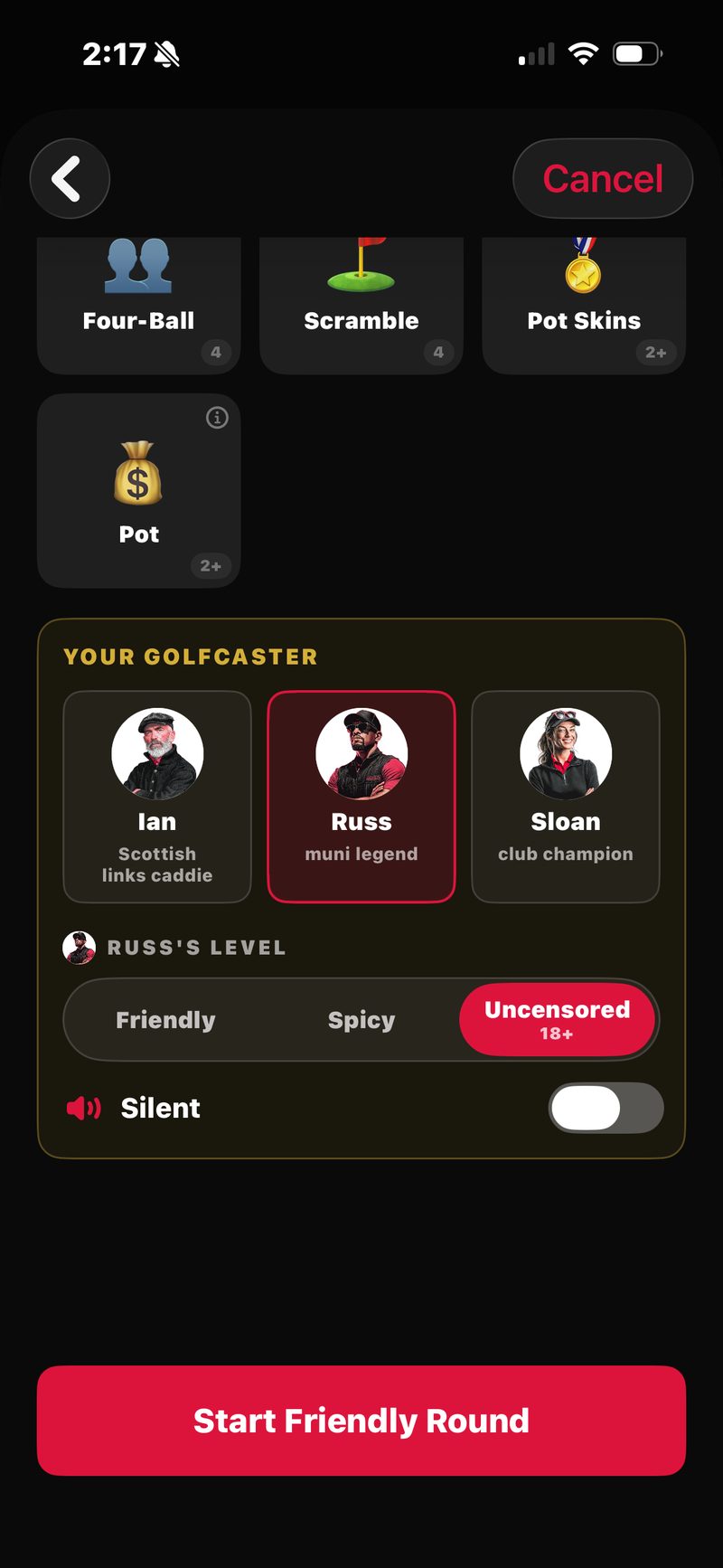
The Golfcaster card in Game Setup. The voice on top, the level under it, and the Silent switch.
Uncensored is on the same card. Because it unlocks adult language, the host has to confirm they’re 18 or older and that every player in the round is OK with adult content.
Mid-round
Only the host can change the level once the round is underway. Open the ☰ MENU and tap the level you want in the Level row. It carries your Golfcaster’s name, like Russ Level or Sloan Level. The new level starts with the next call.
5. Muting and per-phone audio
Each player controls the audio on their own phone. Your mute doesn’t affect anyone else, and theirs don’t affect you.
- Before the round (host): flip Silent on the Golfcaster card and the round starts quiet on your phone.
- During the round (everyone): tap MUTE at the bottom of the Golfcaster rail on the map. It turns red and reads MUTED. Or use the mute row in the ☰ MENU (it carries your Golfcaster’s name, like Mute Russ). Tap again to bring the voice back. A mute lasts until you unmute.
Muted but still want a club call? Tap CLUB and the call shows on screen as text.
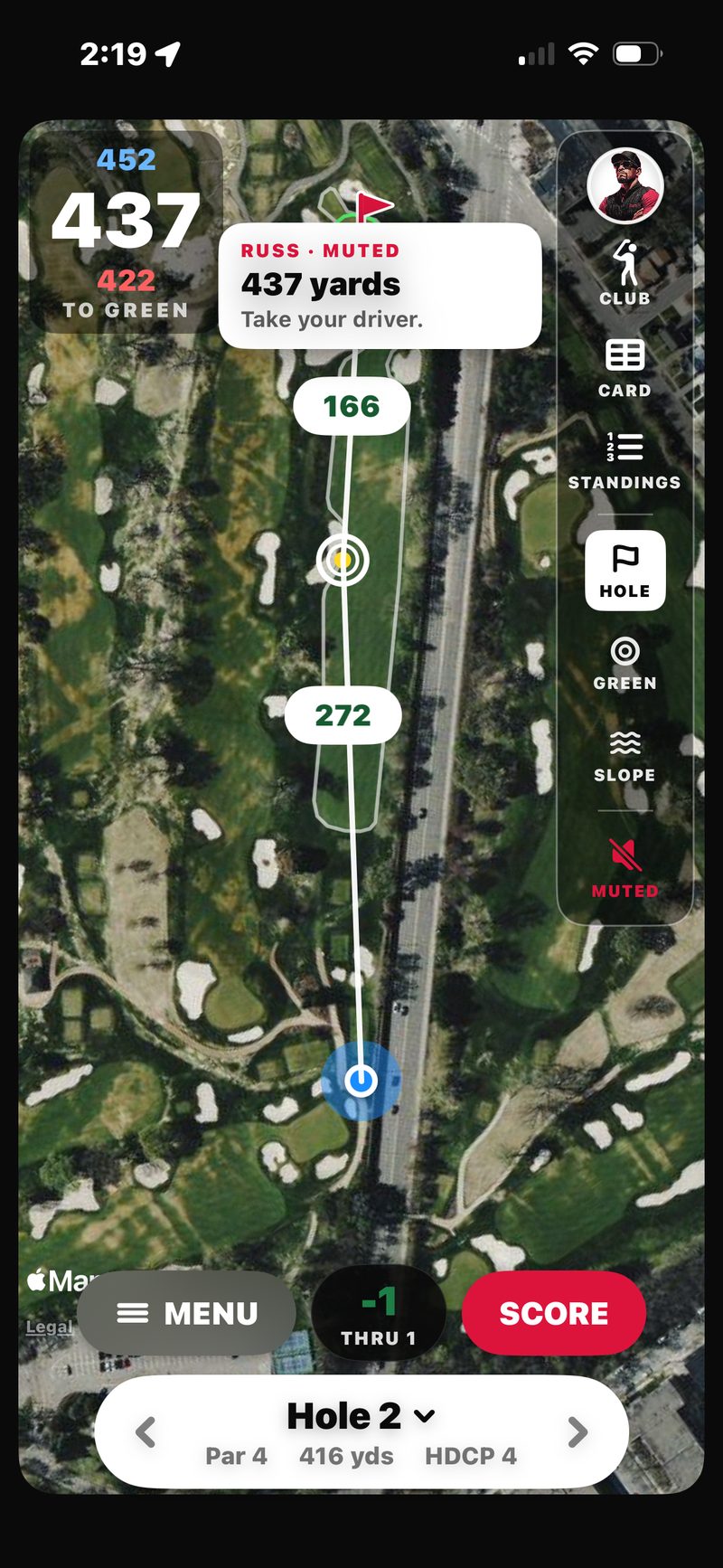
Muted. MUTE turns red and reads MUTED, and a CLUB call shows up as text: “437 yards. Take your driver.”
The host can also choose which phones in the foursome play Golfcaster audio, from ☰ MENU → Foursome audio.
6. What triggers a call
Your Golfcaster talks without being asked. It reacts to your scores, your GPS position, and a few buttons on the map.
The first tee
Before a ball is struck, your Golfcaster opens the show and announces every player to the first tee by name.
Score events (per player)
When a player records a notable score: hole-in-one, albatross, eagle, birdie, bogey, double bogey, triple bogey, double par, or a bigger blow-up. On a quiet hole, even a par gets a word. The call comes once every player’s score for the hole is in, by name.
Each hole gets one call. In a group round, one phone fires it and every phone plays the same one, in sync.
Round-wide events
Things that affect the whole round: a skin won, a press, a Nassau segment closed out, the state of a match (“first blood”, “2 up with 4 to play”, “wins it 3&2”), a Lone Wolf called (with a wolf howl) or the snake changing hands (cue the rattle). Most of these ride along in the hole’s call. On 18-hole rounds you also get a turn report after the first nine, and a round wrap at the end.
Each one fires once, from one phone, so a call never plays twice.
Friendly rounds stay money-free. In a no-wager round your Golfcaster still calls the birdies, the blow-ups, the turn report and the recap. It just never mentions money. It’s all golf and bragging rights.
Caddie moments (GPS)
Your Golfcaster carries the bag too. At every tee you get a hole preview: par, shape, and where the trouble is. When you walk onto the green, you get a call. In a group round, one phone triggers each of these and the whole group hears it together.
Tap CLUB on the Golfcaster rail any time for a club call. Set your carries in Profile → My bag and the call names your actual club. STANDINGS on the same rail opens the standings. Tap the Says button in that sheet to hear where the round stands, read out.
7. The Booth
The Booth is the tab in the bottom nav where the Golfcasters live. Tap a portrait to switch between Russ, Ian and Sloan, hear each one introduce themselves, and play a sample of every level. The Booth only plays samples. It doesn’t change any setting. You pick the voice and level for each round on the Golfcaster card.
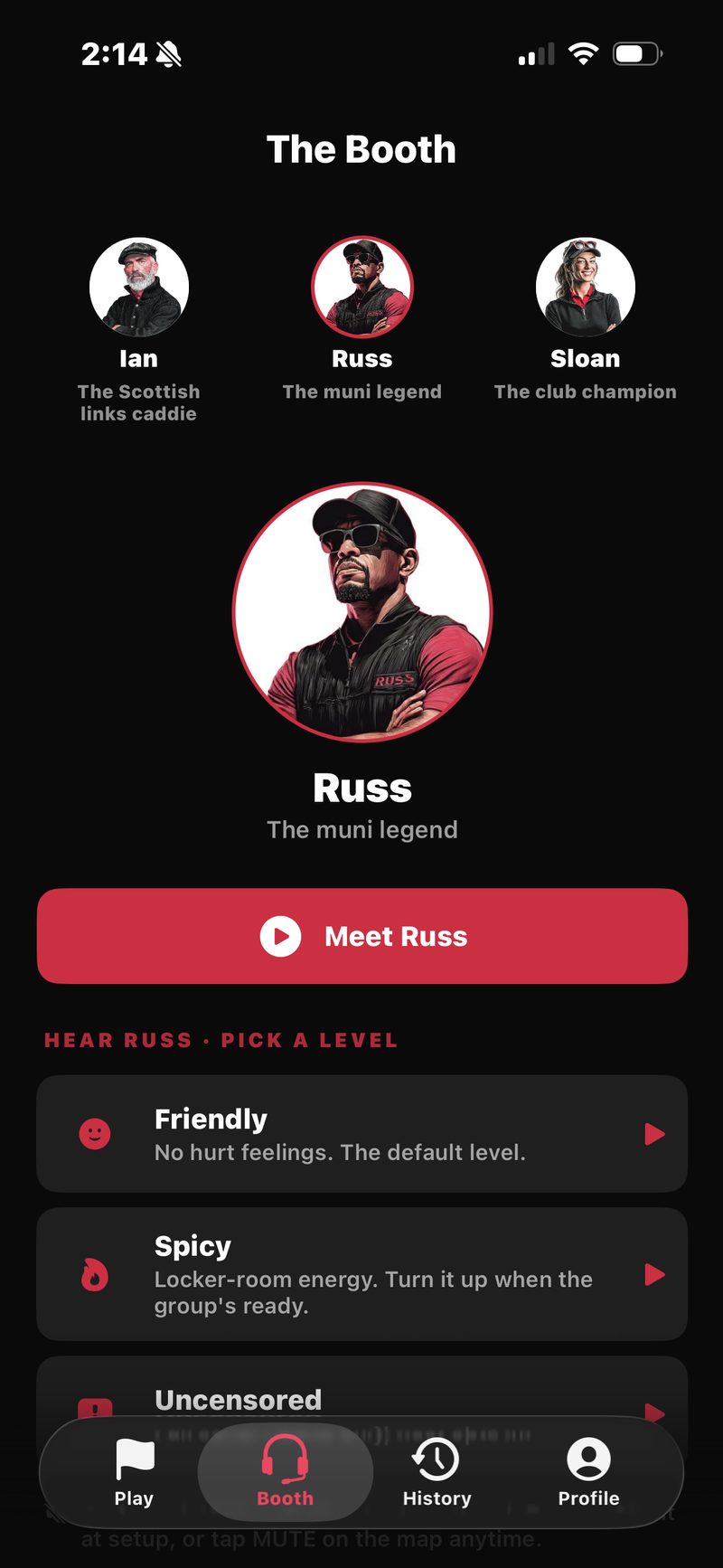
The Booth. Tap a portrait to switch, meet them, and play a sample of each level.
Over on the Profile tab, My bag sets the club distances your Golfcaster uses for club calls.
8. Recaps
When the round ends, the Golfcaster who called it writes a short recap. Who jumped on the front, who hung tough, who couldn’t buy a break. It sits on top of the final leaderboard and the money to the cent.
The written recap and the round emails are in your round’s Golfcaster’s voice. If Sloan called the round, Sloan writes it up. See Round history for where recaps live after the round.
9. Your Golfcaster’s Picks
In Game Setup, the first tile in the game grid carries your Golfcaster’s name, like Russ’s Picks. It’s three ready-made game setups, one tap each:
- Easy. $5 / $5 / $5 Nassau, all match play, handicaps on.
- Standard. $10 / $10 / $20 Nassau plus 25¢ Skins, handicaps on.
- All the Smoke. $20 / $20 / $40 Nassau plus $5 Skins, handicaps on.
Tap one and it fills in the games and stakes for you. If you already picked games, it asks before replacing them. Picks don’t change the trash-talk level. Rather build your own? Just tap the game tiles. See Games & Bets.
10. Why did it say that?
Every call has a trigger. If something feels off, it’s usually one of two things:
- It called out a number instead of naming the score. Blow-ups worse than double par get called by the number itself, like “Seven.” Score calls are based on your score against par, so check the par on that hole.
- It called your handicap-adjusted score, not your gross. When handicaps are on, your Golfcaster celebrates your net score and says so. A 5 on a par 4 with a stroke is a “net par”, a par with a stroke is a “net birdie”. Gross-only feats (a hole-in-one, an albatross, an eagle) are always called on the real number.
If you hear something that seems impossible, like a carryover for 6 holes on hole 3, or the same call twice in a row, that’s a bug. Email support@forepaid.app with the round details (course, hole, which Golfcaster, what it said) and we’ll trace it.