Settling Up
How money moves at the end of a round.
- How settlement works
- FOREPAID doesn't hold the money
- Settling up with each other
- Marking debts paid
- The three post-round phases
- When a bet voids — no money moves
- If someone leaves mid-round (DNF or Leave Round)
- Finishing a round early
- Settling a group event
- If a score or settlement looks wrong
- What FOREPAID doesn't do
1. How settlement works
When the last score lands, the Score Review card opens on the host’s phone. You can get back to it any time with the green Review Scores button. The review shows the full scorecard. Tap Settle Up and FOREPAID works out the pairwise debts.
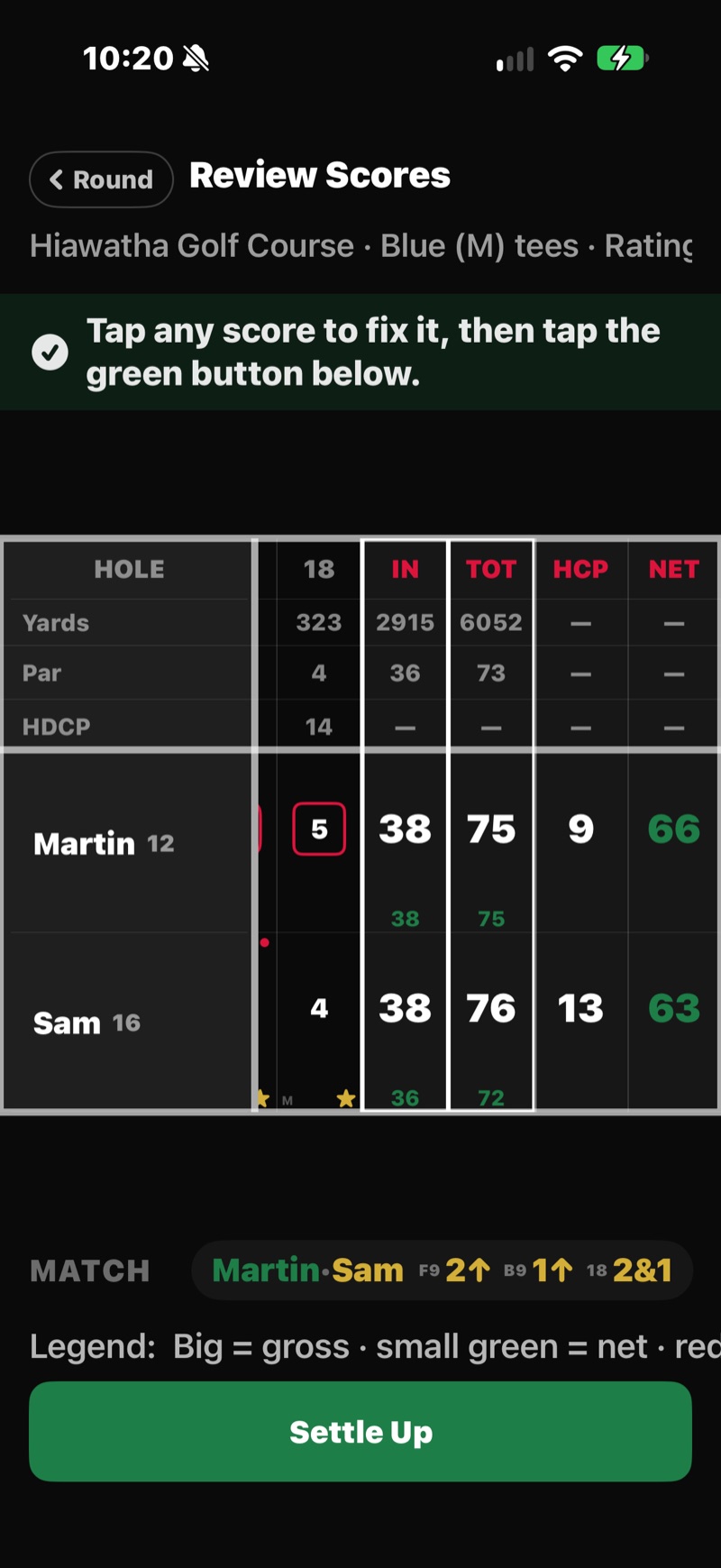
Pairwise means every bet runs between every pair of players. In a foursome, your Nassau with Bryan T. is a separate bet from your Nassau with Ravi K. Six pairings in a foursome total.
At settle time those pairwise debts net out and you see one number per pair.
You won the Front 9 vs Bryan T. ($5). Bryan won the Back 9 vs you ($3). The Overall tied. Bryan won a $2 skin.
Net: Bryan owes you $5 − $3 − $2 = $0. You're square.
2. FOREPAID doesn't hold the money
We don't have a wallet. We don't sit between you and your friends. The money moves directly between you and your friend, by whatever method the two of you choose. FOREPAID tracks who owes whom — that's it.
This is intentional. Holding money would mean we'd be a regulated money-transmitter — which would mean fees, KYC checks, and a slow payout. Instead, players pay each other directly, outside FOREPAID.
3. Settling up with each other
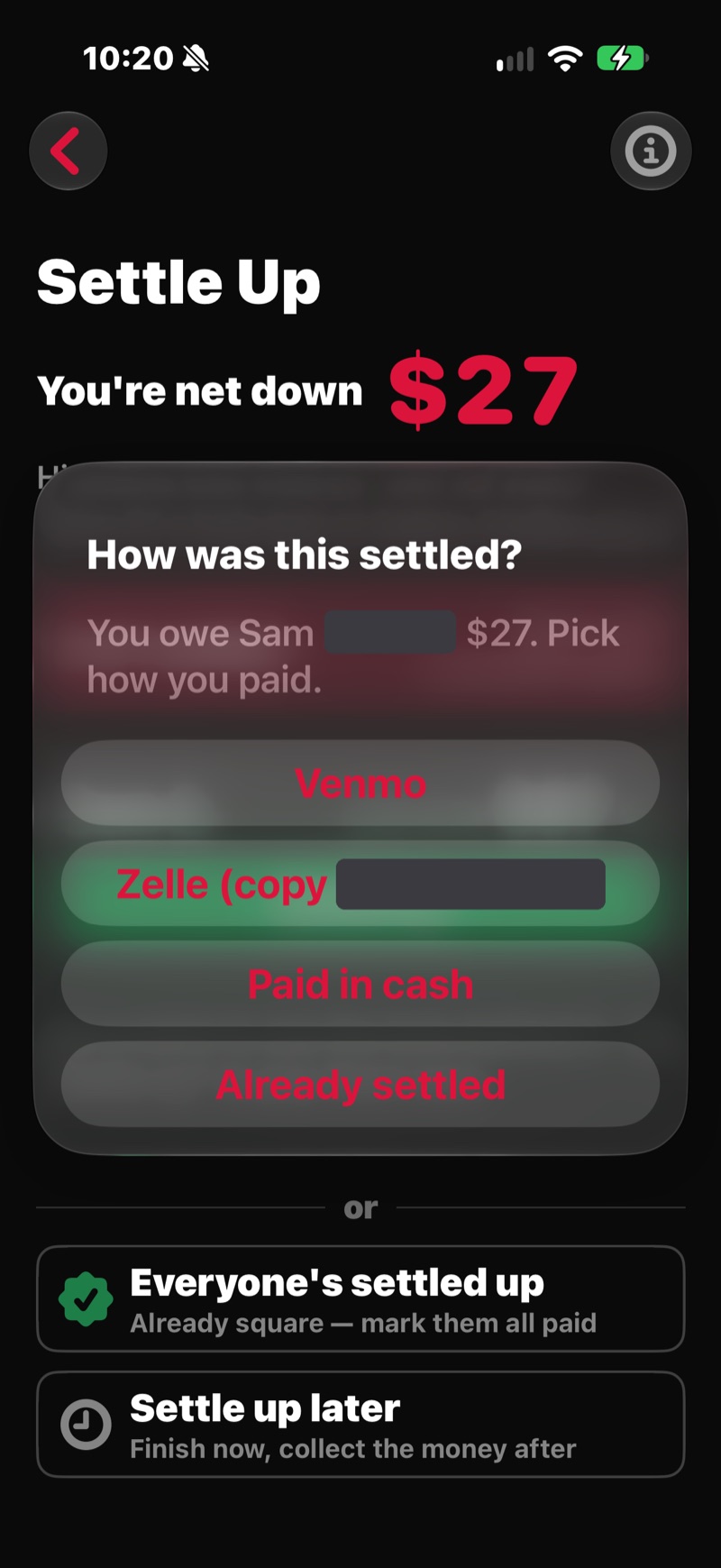
On the Settle screen, each pair has one Settle up button. Players settle up directly with each other, using whatever method they prefer. Tap the button and FOREPAID asks How was this settled? so the record matches what happened:
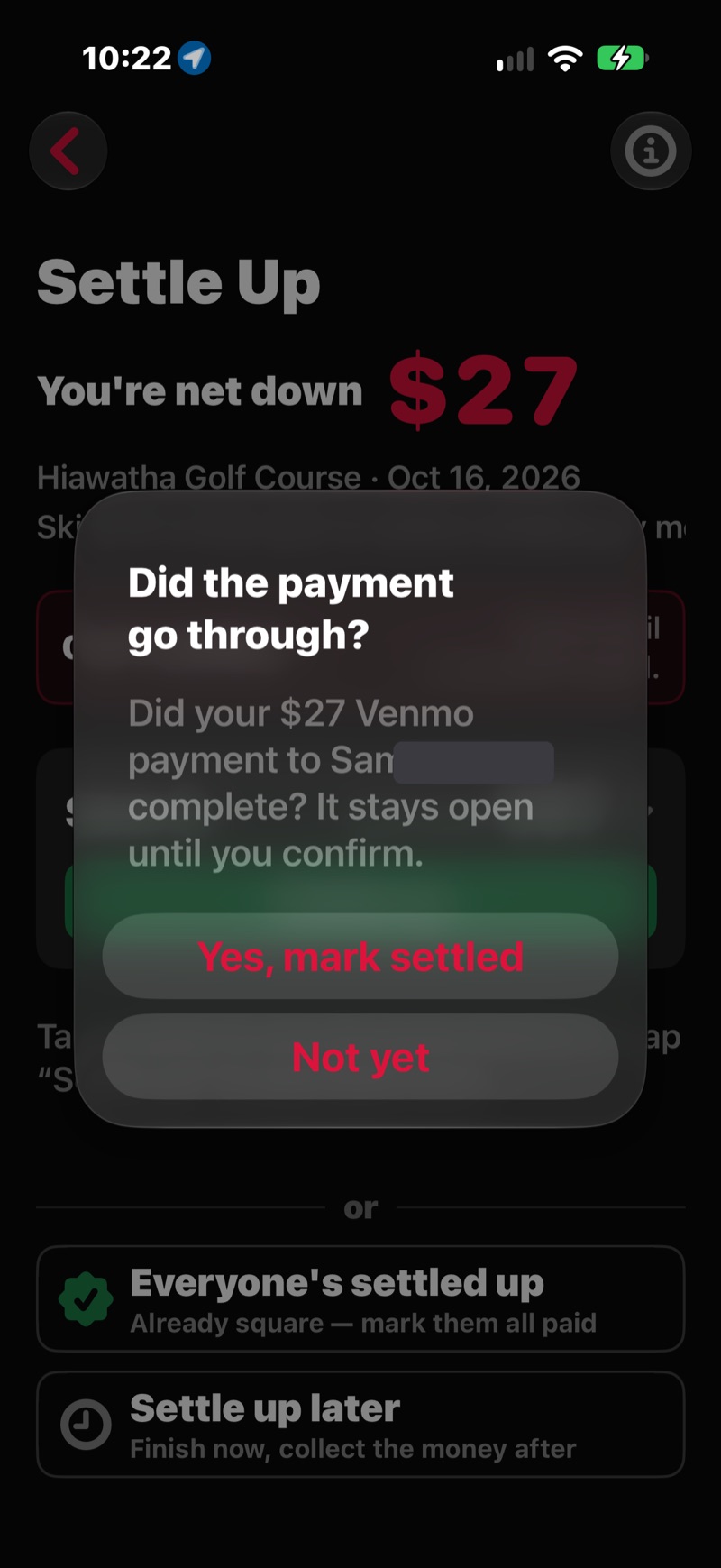
- A payment method your friend saved. If they added one under Profile → Payment methods, it shows here. Tapping it opens that payment app, or copies their details so you can pay from your bank app. The payment happens there, not in FOREPAID. When you come back, the app asks Did the payment go through? Tap Yes, mark settled once it has.
- Paid in cash marks it paid.
- Already settled marks it paid when you squared up some other way.
Which options appear
- A saved payment method shows when your friend has added one and you’re the one who owes.
If none shows, your friend hasn't added one. They can add it under Profile → Payment methods, and it shows up the next time the Settle screen loads. You can always pick Paid in cash or Already settled. Owed money and have none saved yet? The Settle screen offers a shortcut to add how you like to be paid.
4. Marking debts paid
When you come back to FOREPAID after paying, it asks Did the payment go through? Tap Yes, mark settled, or Not yet to leave it open. Paid some other way? Use Paid in cash or Already settled. The pair then shows as paid, like “Paid · Cash”.
Marking a debt paid is bookkeeping only. It doesn't move money. It records that the debt is settled so both players see it cleared on the Settle screen. If the amounts changed since your Settle screen loaded, the first Mark Paid stops and says The amounts changed. Check the Settle screen again before paying.
Already squared up in person? The host can tap Everyone's settled up, then Mark all paid, to mark every remaining pair paid and close the round.
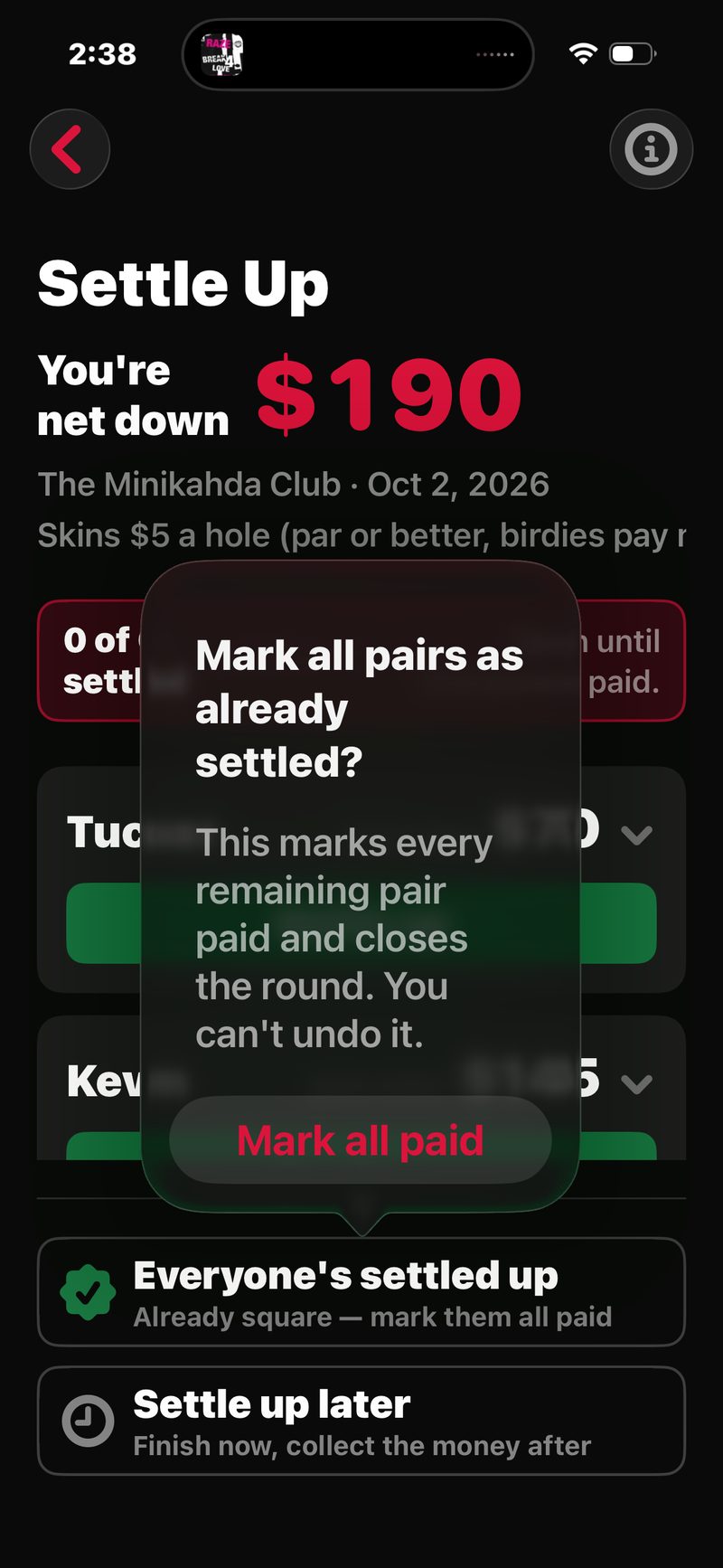
Waiting on a payment? The host can tap Settle up later. The round closes and moves to History with a crimson Unsettled chip. Open it from History anytime and tap Settle up now to mark the debts paid.
The pushes that follow the money
When the books close on a money round, everyone gets a push titled “<Course>: books are closed” with their own number: “You took $12 on this one.” or “You paid out $8 on this one.” when every line is already paid, “Up $12 on this one. Settle when you’re ready.” or “You owe $8. Tap to settle up.” when money is still open, and “Pushed. No money moves on this one.” when you broke even. The fully paid and push lines end with your Golfcaster’s name, like “Russ has the recap.” A friendly round says “Russ called it. Tap to hear the recap.” (with whichever Golfcaster called your round).
Still owed money a day after the round closed? You get one reminder, “You’re owed $20”, telling you to collect from that course and tap to settle up. It goes only to the people owed, once per round, within the first week.
Walked off without closing out? About two hours after the last score, FOREPAID nudges the host: “Wrap up your round?” if you left early (finish on the holes you played), “Your recap’s waiting” if all the holes are scored but the round was never closed, or “Ready to tee off?” if it was set up and never scored. One follow-up, “Still want your recap?”, comes about a day later. Then it stops.
Marking a debt paid can’t be undone in the app, so double-check before you tap. If you marked one by mistake, email support@forepaid.app with the round details.
5. The three post-round phases
After the last hole, a money round moves through three phases. The host drives the screens and everyone else’s phone follows. The first payment marked by anyone locks the scores.
- ReviewingAll holes scored, nothing paid yet. The Settle screen updates live as scores change.
- LockedSomeone marks the first debt paid. The card reads Round locked, because money has moved.
- ClosedEvery pair has paid. The round sits in History for good.
Marked a payment by mistake? Email support@forepaid.app.
6. When a bet voids — no money moves
Some round outcomes mean the bet doesn't settle at all. The Settle screen makes these clear so you don't wonder where the money went.
- Tied pairs and segments. Nassau segments, Match Play, Stroke Play, and Wolf all settle pairwise — when a pair (or a segment) ends level it shows All square (or Tie on that line) and no money moves between those two players, but everyone else still settles. A tie never voids the whole round.
- Skins carry that never resolves. If skins are still carrying when the round ends (a tie on the last hole, or nobody made par or better on a par-or-better game), that carried pot refunds. You'll see a Skins bet voided note on the Settle screen.
- Stroke Play, low round takes the pot. If everyone ties, everyone gets their money back.
- Pot Skins. If nobody earns a skin, the pot returns.
- FOREMajors. A match still tied when you run out of holes splits. An unplayed match refunds.
- Vegas. Even points, nobody pays.
- Four-Ball and 2-Person Scramble. A tied match or tied total pushes.
7. If someone leaves mid-round (DNF or Leave Round)
Sometimes a player has to bail before 18 — work emergency, kid sick, lightning closed the course. FOREPAID handles it with a DNF (did not finish) mark.
The forfeit rule
DNF works two ways, depending on the game:
- Per-hole games (Skins, Match Play, Wolf, a match-style Nassau segment) — a DNF hole is a forfeit: the hole goes to whoever’s still in.
- Total-score games (Stroke Play against each player, a medal-style Nassau segment) — a player can’t post a fair total with holes missing, so the DNF player is out of that bet (a medal segment containing a DNF voids for that pairing) rather than hit with a made-up worst score.
- Stroke Play pot (low round takes the pot) — a player who picks up still pays in but can’t win the pot.
- Vegas — a pickup counts as a double bogey, so it can’t wipe out the other team’s hole.
Marking DNF
Long-press a player’s row on the score pad and confirm DNF — or just step their score below 1 with the minus button, which offers the same confirm. The hole locks with a gold “DNF” label instead of a stroke count. You can also do it from the CARD grid: tap the cell, then DNF (tap twice to confirm). A stray score on the grid? Tap the cell and use Clear. You can DNF yourself or a guest any time; another real player only while their cell is empty (the classic “picked up and walked in” case).
If a player has to leave for the rest of the round, mark each remaining hole DNF so the round can settle. The settle button doesn't unlock until every player has either a score or a DNF for every hole.
What about the rest of the round?
The other players keep playing. Their wagers settle normally based on the scores of whoever's still in. The DNF player owes the forfeit amounts but doesn't score anything more after they're out.
Leave Round vs DNF
A player who isn’t the host can also tap Leave Round in the ☰ MENU. That’s different from DNF:
- DNF keeps them in the round. They pay the forfeits on the holes they miss.
- Leave Round takes their seat and their scores off the round, so they’re out of every bet and owe nothing. The group sees “Frank E. left the round.” If only one player is left, the bets are off. A 2 vs 2 team bet they were in switches off, and the other bets still count.
- Once the host opens Review on a money round, nobody can leave. The app says Can’t leave this round.
Owe money for the holes you played? Use DNF, not Leave Round.
8. Finishing a round early
Cut it short? The host can end a round before the last hole from the ☰ menu: tap Finish at Hole N (N is the last hole scored), or Keep Playing to go back. Finish opens the Score Review card; tap Settle Up (or Finish Round on a friendly round) to close it out. Finishing is different from Cancel: cancelling throws the round away, while Finish closes it out and settles what you actually played.
Settlement runs on the holes played. Unplayed holes simply don’t count, and nobody forfeits. Most games settle over those holes as usual: Skins, Wolf, Snake, Match Play, Stroke Play (either way it pays), Pot Skins, Four-Ball, 2-Person Scramble and Vegas. There are three exceptions:
- Nassau: any segment (Front 9, Back 9, or Overall) whose holes weren’t all played voids. No winner, no money for that segment.
- Presses: a press whose holes were not all played voids, the same as the segment it was pressed on.
- FOREMajors: any major whose holes weren’t all played voids and its pot refunds. That includes the Crimson Jacket.
An early-finished round earns a “Partial” chip in your History, and your Golfcaster signs off with a “calling it here” wrap instead of the full-round close.
9. Settling a group event
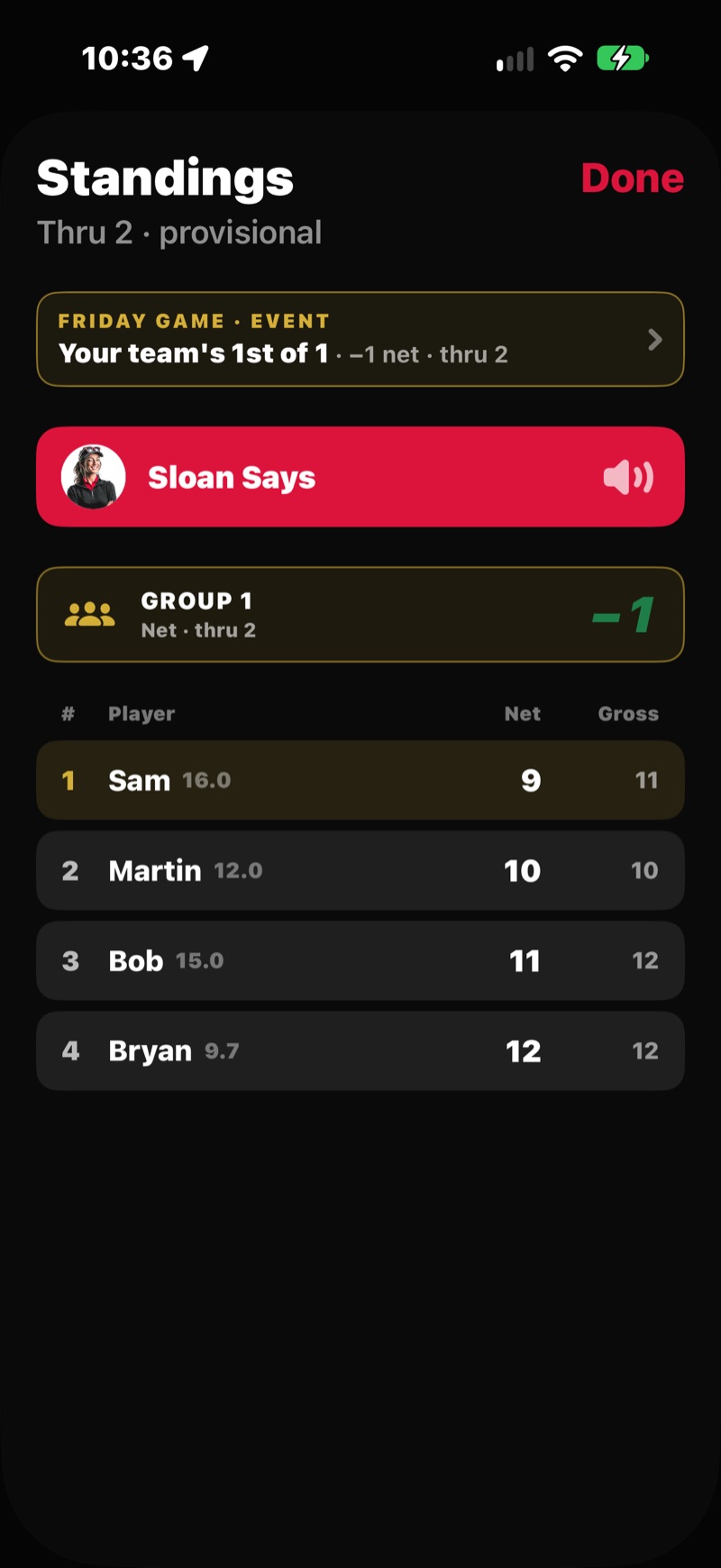
Played a group event with more than one foursome? Your foursome’s side games settle as usual. The event money settles when every group is in and the event host taps Close the event and settle. Event money and your foursome’s side games are paid together in the fewest payments, so most people make one payment or receive one.
- If several people owe you, you get one list and one Mark all received.
- Guests have no app to pay from, so their event lines sit under Your guests on the host’s settle card with a Mark paid in cash button (or Mark all N paid in cash).
- If a group never finishes, the event host can Close early. That group’s unplayed holes count as did not finish for the event game: they can’t win those holes, and they still pay. Each group’s own bets aren’t affected.
- If the event host has left, anyone can close the event 30 minutes after the host’s round ended.
When the event closes, everyone in it (except the person who closed it) gets a push titled “<Event>: in the books”. If you have event money to settle it says so; otherwise it points you to the final leaderboard.
Open event money shows a red Unsettled chip in History until it is paid.
10. If a score or settlement looks wrong
Before tapping Settle Up, the score-owner can edit any score from the Scorecard, and any change updates everyone’s standings in real time. If two phones ever submitted different numbers for the same hole, a resolve sheet lists every conflict at review time — the score’s owner (or the host) picks the right value before the money can finalize.
Once a round is settled, scores lock to preserve an audit trail. If you spot an error after settlement, email support@forepaid.app with:
- The course and date
- The names of the players
- Which score is wrong and what it should be
We can void the round on the back end so the group can re-enter it. We don't ever change individual scores ourselves — that has to come from the players in the round.
11. What FOREPAID doesn't do
- We don't take a cut. The stake your group agrees to is the stake that moves. FOREPAID's revenue comes from the subscription (Monthly, Annual or Founder), not from your wagers.
- We don't lend money. If someone owes more than they can pay, that's a conversation between you and them.
- We don't issue tax forms. The amounts are personal friend-to-friend transfers. Handle taxes per your own situation.
- We don't extend credit. Every settlement is between two people who already played the round together.
Still stuck on a settlement? Email support@forepaid.app with the round link from your share screen and we'll walk through it with you.